
The Problem
A 500-person enterprise fills out a demo request and ends up on an SMB rep's calendar. A prospect in Germany gets offered a 6am slot with the US team. A high-intent lead submits a form and waits two days for someone to send a booking link.
Most teams have routing logic somewhere in their CRM or ops workflow. But it kicks in after submission. By the time the lead gets assigned and a link goes out, the moment has passed.
Surface moves that routing decision into the form itself.
How Conditional Calendar Routing Works in Surface
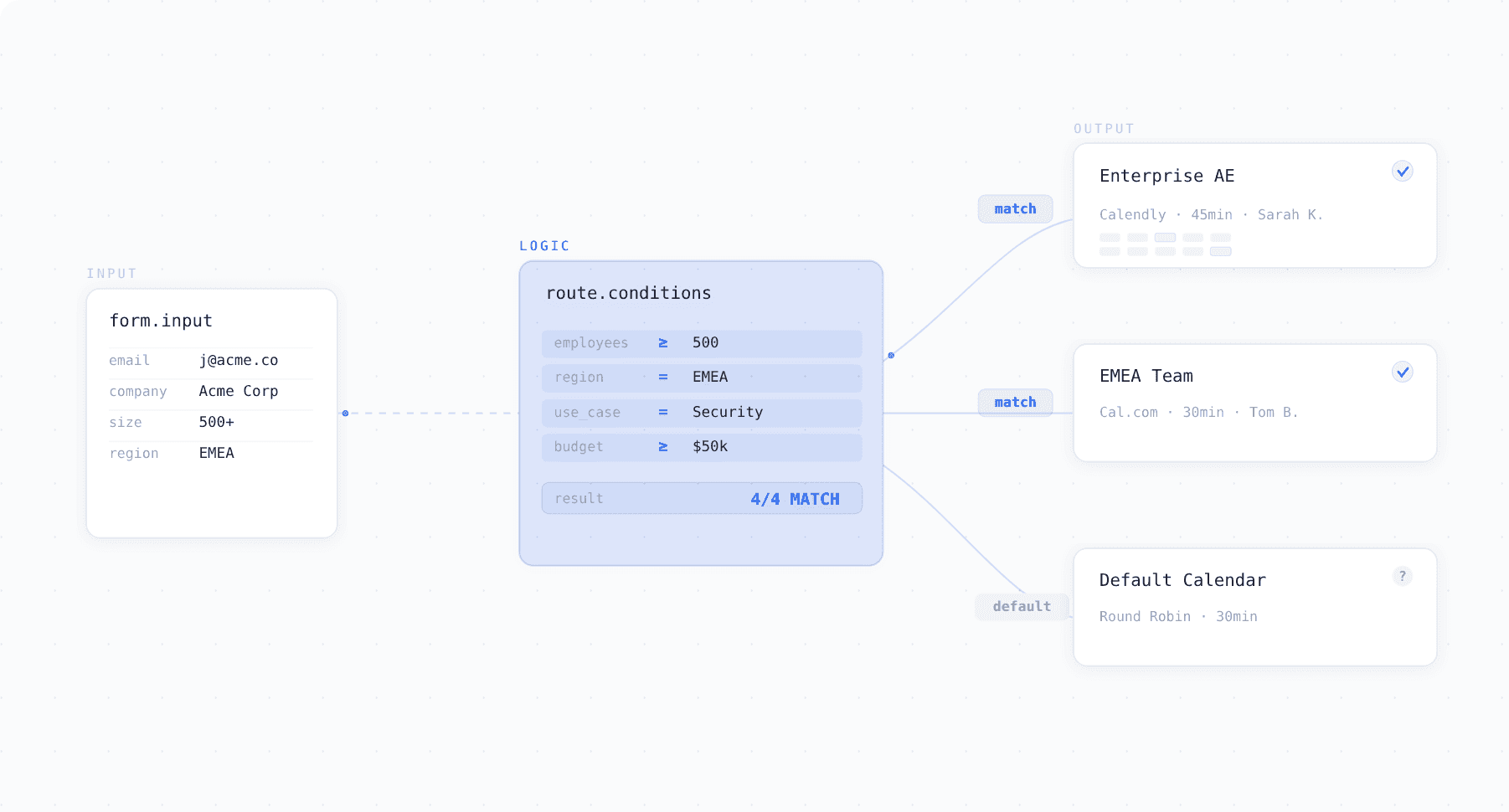
Surface lets you build routing rules directly into your form logic. Company size, region, industry, use case, budget any combination of fields can determine which calendar appears at the scheduling step.
| Prospect responds with... | Calendar shown |
|---|---|
| 500+ employees | Enterprise AE |
| 50 or fewer employees | SMB sales rep |
| Located in EMEA | European team |
| Enterprise + EMEA + Security use case | Senior SE in London |
You can combine multiple conditions in a single route. When the prospect reaches the scheduling step, the right calendar shows up directly in the form, no redirects, no extra pages, no one manually assigning leads on the backend.
Each route is defined by conditions you set using any form field. For example, if a prospect selects "500+ employees" and "EMEA," Surface knows to show the Senior Enterprise AE calendar for that region.
Why This Matters
Traditional routing: Form → Submission → CRM workflow → Assignment → Rep emails booking link → Prospect books (maybe, 24-48 hrs later)
Conditional calendar routing: Form → Right calendar appears → Booked (under 60 seconds)
The result is that every meeting on a rep's calendar is already correctly assigned, no misroutes, no manual cleanup, and no prospect left waiting for a follow-up email.
Surface also connects with Calendly, Chili Piper, Cal.com, and other scheduling platforms. No migration required.
What If a Lead Doesn't Match Any Rule?
Surface shows a default fallback calendar so no lead goes unbooked. You configure this once and it catches any submission that falls outside your specific routes.
Frequently Asked Questions
Can I show different calendars based on form responses? Yes. Surface evaluates routing rules in real time. The calendar matching the prospect's responses appears automatically at the scheduling step.
Does this work with Calendly or Chili Piper? Yes. Connect your calendars in the integration settings and reference them in the form logic.
Does this add extra steps for the prospect? No. Routing happens behind the scenes. The prospect fills out the form, the right calendar appears, they book.
Can I combine multiple routing conditions? Yes. Company size plus region plus product interest plus budget — Surface evaluates all conditions together.
How is this different from CRM-based lead routing? CRM routing happens after submission, which introduces delay. Conditional calendar routing happens during the form, so the prospect books immediately with the right person.